Obeo AI for Capella Architecture
In this document, Agentic AI Client means the application that manages the user conversation, communicates with an LLM, and invokes MCP tools. Examples include ChatGPT desktop app, Codex CLI, Claude Code, Kiro IDE, and other MCP-capable agentic applications.
Product names in this document identify a specific client surface. ChatGPT desktop app includes the Codex coding agent, while Codex CLI remains the current name of the codex terminal client. Google provides Antigravity IDE and Antigravity CLI for current general-purpose agentic development; Gemini CLI remains documented here only for supported enterprise, Google Cloud, and paid API-key deployments.
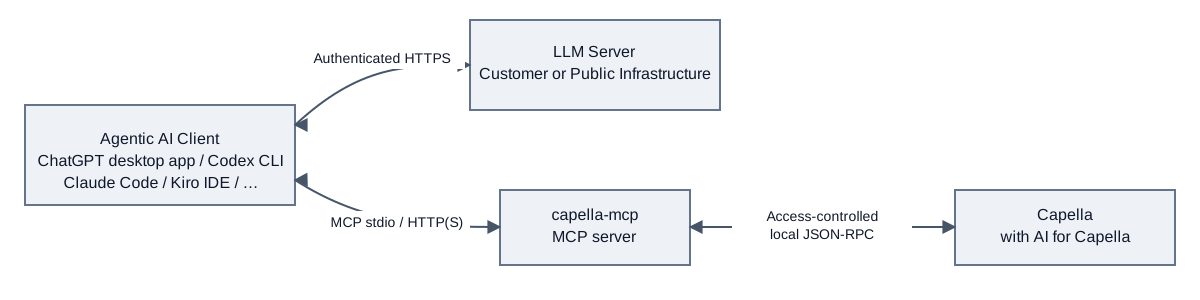
The Agentic AI Client exchanges prompts, responses, and tool results with an external LLM server over authenticated HTTPS. It invokes capella-mcp through MCP, while capella-mcp discovers the running Capella instance and communicates with the AI for Capella Automation Server over access-controlled local JSON-RPC. The LLM server does not connect directly to Capella.
There are two separate connections: the AI client uses MCP over stdio or HTTP/HTTPS to reach capella-mcp; the MCP server always uses local JSON-RPC over a loopback TCP connection to reach Capella. JSON-RPC describes the messages, while stdio and HTTP describe how messages are transported. Selecting HTTP for MCP does not expose Capella’s internal JSON-RPC endpoint. See Transport and access rights for the permissions required by each mode.
The local JSON-RPC connection is access-controlled rather than TLS-encrypted. Capella listens only on the 127.0.0.1 loopback interface and uses an ephemeral port. On each start, it generates a 256-bit connection token and stores it in the per-user runtime registry; on POSIX file systems, the registry directory and metadata files are restricted to modes 0700 and 0600. Capella validates the token before starting the JSON-RPC session and, by default, also asks the user to approve the connecting automation client. These controls rely on the security of the local host and user account; the loopback TCP payload itself is not protected by TLS.
On Windows, registry access relies on the existing and inherited access control lists (ACLs) of the user directory; the Automation Server does not configure Windows ACLs. Keep registry files private: they contain a connection token and must not be attached unchanged to diagnostic reports.
The following view makes the standalone capella-mcp process and the local JSON-RPC connection to Capella explicit.
For setup instructions, see the installation guide.