Build applications based on Obeo Enterprise for SysON
Building applications based on Obeo Enterprise for SysON requires fetching Maven artifacts from GitHub Packages (for the open source components coming from Sirius Web, SysON, and Capella for SysON) and AWS CodeArtifact (for the proprietary components of Obeo Enterprise for Sirius and Obeo Enterprise for SysON). An application with its own NPM build also needs access to the corresponding NPM artifacts.
The sections below document how to obtain the tokens needed to access these repositories and how to configure your build to use them.
The Capella for SysON Maven repository is required when resolving oe4syson-capella-configuration, even if the Capella integration is disabled at runtime.
1. GitHub
Even though Sirius Web, SysON, and Capella for SysON are open source, GitHub Packages requires a token to access the artifact repositories.
Use a GitHub account and create a personal access token with the read:packages permission at https://github.com/settings/tokens/new.
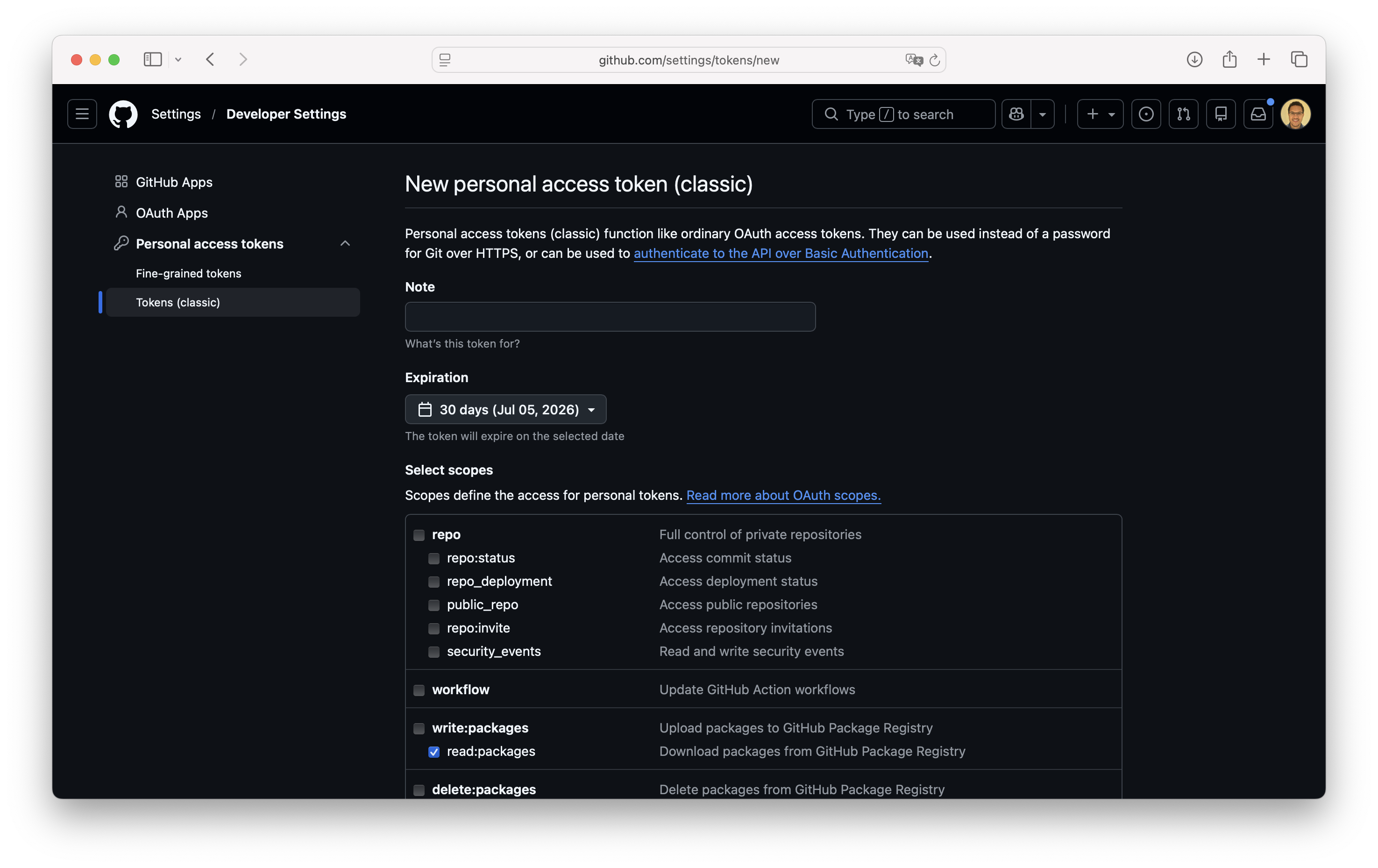
Store this personal access token in an environment variable on your computer, for example, GITHUB_TOKEN.
This token will be used to retrieve Maven modules and, if applicable, NPM packages from GitHub Packages where the code of SysON, Capella for SysON, Sirius EMF JSON, and Sirius Web is hosted.
2. AWS CodeArtifact
Start by adding the API key provided by Obeo as an environment variable named CODEARTIFACT_API_KEY.
Contact Obeo if you do not have this API key yet.
Use the scripts provided by Obeo to retrieve access tokens to log in to AWS CodeArtifact and download the Maven modules and, if applicable, NPM packages of Obeo Enterprise for Sirius and/or Obeo Enterprise for SysON.
The modules that you can access depend on the CODEARTIFACT_API_KEY provided by Obeo.
Make the downloaded script executable and run it to view the instructions for setting up your AWS CodeArtifact token for Obeo Enterprise for Sirius.
This script is only supported under Linux and macOS.
Windows users can try it with WSL (Windows Subsystem for Linux), but Obeo does not provide support for these platforms.
It requires both curl and jq.
chmod +x get_oe4si_token.sh
./get_oe4si_token.sh
Follow the instructions displayed and export the AWS CodeArtifact token as an environment variable.
export CODEARTIFACT_TOKEN_OE4SI="..."Make the downloaded script executable and follow the same steps to set up your AWS CodeArtifact token for Obeo Enterprise for SysON.
chmod +x get_oe4sy_token.sh
./get_oe4sy_token.sh
Follow the instructions displayed and export the AWS CodeArtifact token as an environment variable.
export CODEARTIFACT_TOKEN_OE4Sy="..."The AWS CodeArtifact tokens generated will then be valid for the next 12 hours.
As mentioned in others parts of the documentation, YEAR.MONTH.0 versions are stable and suitable for production deployments, so you should rely on those versions in your builds and not on YEAR.MONTH.N versions, which are only meant for development and testing purposes.
As such, you should not need to refresh the AWS CodeArtifact tokens more than once every 2 months, when a new stable version is released.
By default, the scripts output detailed instructions in addition to the token itself, for example:
[info]  Retrieval of the AWS CodeArtifact Token...
[ok]    CODEARTIFACT_TOKEN_OE4SI to export as an environment variable:
[ok]    export CODEARTIFACT_TOKEN_OE4SI="XXXXXXXXXX"
        Configure your settings.xml with: <password>${env.CODEARTIFACT_TOKEN_OE4SI}</password>
        Configure your .npmrc with: //obeo-880882846414.d.codeartifact.eu-west-3.amazonaws.com/npm/OE4SI/:_authToken=${CODEARTIFACT_TOKEN_OE4SI}
        Configure your .npmrc with: @obeo:registry=https://obeo-880882846414.d.codeartifact.eu-west-3.amazonaws.com/npm/OE4SI/
[ok]    The token will expire on: 2026-06-18T20:25:04Z
To facilitate integration into an automated build, you can run the script with the CI environment variable set, in which case it will only output the raw token value.
export CODEARTIFACT_API_KEY="..."
export CI="1"
export CODEARTIFACT_TOKEN_OE4SI="$(./get_oe4si_token.sh)"
export CODEARTIFACT_TOKEN_OE4Sy="$(./get_oe4sy_token.sh)"
# The rest of the build can access the fresh tokens' values through $CODEARTIFACT_TOKEN_OE4SI and $CODEARTIFACT_TOKEN_OE4Sy
Do not commit the actual value of `CODEARTIFACT_API_KEY` in a build script. It should instead be injected into your build environment by the mechanism provided by your CI tool (e.g. https://www.jenkins.io/doc/book/security/credentials[credentials in Jenkins], https://github.com/pcdavid/sirius-kit/settings/secrets/actions[secrets on GitHub Actions]).
3. Maven Build
Next we need to tell Maven to use these tokens as credentials to access the relevant GitHub Packages and AWS CodeArtifact repositories.
This can be done by having a settings.xml similar to the following, with your_github_username replaced with the name of the GitHub account used above to create the GITHUB_TOKEN.
When invoking Maven from your build, refer to this file using --settings path/to/settings.xml.
Maven should be executed in an environment where the GITHUB_TOKEN, CODEARTIFACT_TOKEN_OE4SI, and CODEARTIFACT_TOKEN_OE4Sy environment variables are available.
<settings xmlns="http://maven.apache.org/SETTINGS/1.0.0"
          xmlns:xsi="http://www.w3.org/2001/XMLSchema-instance"
          xsi:schemaLocation="http://maven.apache.org/SETTINGS/1.0.0
          http://maven.apache.org/xsd/settings-1.0.0.xsd">

    <activeProfiles>
        <activeProfile>default</activeProfile>
    </activeProfiles>

    <profiles>
        <profile>
            <id>default</id>
            <repositories>
                <repository>
                    <id>Central</id>
                    <url>https://repo.maven.apache.org/maven2</url>
                </repository>
                <repository>
                    <id>github-sirius-emfjson</id>
                    <name>GitHub Packages Sirius EMFJson</name>
                    <url>https://maven.pkg.github.com/eclipse-sirius/sirius-emf-json</url>
                </repository>
                <repository>
                    <id>github-sirius-web</id>
                    <name>GitHub Packages Sirius Web</name>
                    <url>https://maven.pkg.github.com/eclipse-sirius/sirius-web</url>
                </repository>
                <repository>
                    <id>github-syson</id>
                    <name>Apache Maven Packages</name>
                    <url>https://maven.pkg.github.com/eclipse-syson/syson</url>
                </repository>
                <repository>
                    <id>github-capella-for-syson</id>
                    <name>Capella for SysON - Maven Packages</name>
                    <url>https://maven.pkg.github.com/eclipse-capella/capella-for-syson</url>
                </repository>
                <repository>
                    <id>aws-oe4sirius</id>
                    <name>AWS CodeArtifact OE4Sirius</name>
                    <url>https://obeo-880882846414.d.codeartifact.eu-west-3.amazonaws.com/maven/OE4SI/</url>
                </repository>
                <repository>
                    <id>aws-oe4syson</id>
                    <name>AWS CodeArtifact OE4SysON</name>
                    <url>https://obeo-880882846414.d.codeartifact.eu-west-3.amazonaws.com/maven/OE4Sy/</url>
                </repository>
            </repositories>
        </profile>
    </profiles>

    <servers>
        <server>
            <id>github-sirius-emfjson</id>
            <username>your_github_username</username>
            <password>${env.GITHUB_TOKEN}</password>
        </server>
        <server>
            <id>github-sirius-web</id>
            <username>your_github_username</username>
            <password>${env.GITHUB_TOKEN}</password>
        </server>
        <server>
            <id>github-flow</id>
            <username>your_github_username</username>
            <password>${env.GITHUB_TOKEN}</password>
        </server>
        <server>
            <id>github-bpmn</id>
            <username>your_github_username</username>
            <password>${env.GITHUB_TOKEN}</password>
        </server>
        <server>
            <id>github-syson</id>
            <username>your_github_username</username>
            <password>${env.GITHUB_TOKEN}</password>
        </server>
        <server>
            <id>github-capella-for-syson</id>
            <username>your_github_username</username>
            <password>${env.GITHUB_TOKEN}</password>
        </server>
        <server>
            <id>aws-oe4sirius</id>
            <username>aws</username>
            <password>${env.CODEARTIFACT_TOKEN_OE4SI}</password>
        </server>
        <server>
            <id>aws-oe4syson</id>
            <username>aws</username>
            <password>${env.CODEARTIFACT_TOKEN_OE4Sy}</password>
        </server>
    </servers>
</settings>
4. NPM Build (optional)
This section is only relevant when your application has its own NPM build. It is not needed when following Create a Java application based on Obeo Enterprise for SysON, which reuses the oe4syson-frontend Maven artifact.
For an NPM build, configure the credentials NPM uses to fetch dependencies from GitHub Packages and AWS CodeArtifact.
This can be done by adding the following entries in the file .npmrc of your NPM build (typically at the root of your project’s repository, where the top-level package.json lives).
//npm.pkg.github.com/:_authToken=${GITHUB_TOKEN}
@eclipse-sirius:registry=https://npm.pkg.github.com/eclipse-sirius
@ObeoNetwork:registry=https://npm.pkg.github.com/ObeoNetwork
@eclipse-syson:registry=https://npm.pkg.github.com/eclipse-syson
@eclipse-capella:registry=https://npm.pkg.github.com/eclipse-capella
@obeo:registry=https://obeo-880882846414.d.codeartifact.eu-west-3.amazonaws.com/npm/OE4SI/
//obeo-880882846414.d.codeartifact.eu-west-3.amazonaws.com/npm/OE4SI/:_authToken=${CODEARTIFACT_TOKEN_OE4SI}
@obeo-syson:registry=https://obeo-880882846414.d.codeartifact.eu-west-3.amazonaws.com/npm/OE4Sy/
//obeo-880882846414.d.codeartifact.eu-west-3.amazonaws.com/npm/OE4Sy/:_authToken=${CODEARTIFACT_TOKEN_OE4Sy}