Deck
🔥 This feature is currently considered experimental. Try it out and give feedback by reporting bugs and suggesting new features. It’s not recommended for production use.
👥 This feature is available to all users.
The Deck view in Sirius Web provides a card-based interface to browse and interact with model elements. Each element is displayed as an individual card, giving users a clean and readable layout to scan through multiple items—especially when focusing on a specific type of data.
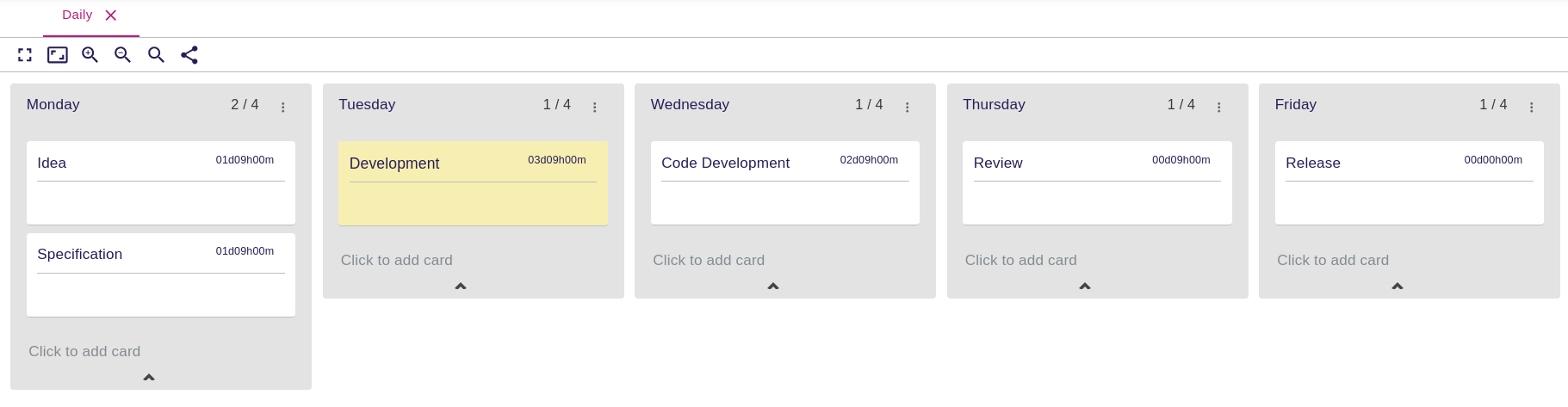
Decks are ideal for presenting collections of similar elements, such as a list of components, tasks, stakeholders, or features, in a compact and visual way.
1. What You Can Do
In a deck representation, you can:
-
View multiple model elements as cards arranged in columns (lane)
-
Click a card to view the properties of its target element in the Details View
-
Show or hide some cards
-
Edit the title, label or description of a card
-
Drag cards between lanes to reflect status changes or reorganize work
1.1. Lane and card actions
Decks provide actions for both lanes and cards:
-
Lane headers: rename the lane, create a new card, toggle cards visible or hidden.
-
Cards: edit the title, label or description in place; delete cards.
-
Drag and drop: rearrange the order of lanes or move a card to another lane to update its status. When enabled by the configuration, the same card can appear in multiple lanes to surface cross-cutting work.
1.2. Deck toolbar

Use the toolbar at the top of the deck to:
-
Toggle full-screen mode.
-
Zoom in/out, reset the zoom, or fit the entire board to the viewport.
-
Generate a shareable link that opens the same deck and selection.
These controls mirror the ones you see on diagrams, so navigation remains consistent across representations.
1.3. Show or hide cards
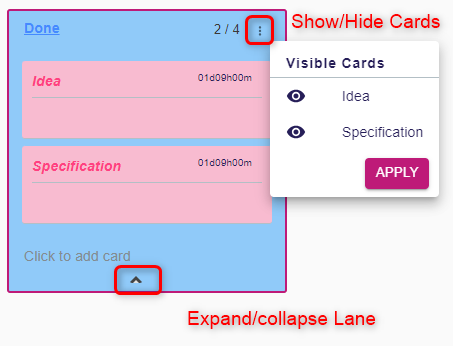
Every lane exposes an expand/collapse action at the bottom.
2. When to Use It
Use the deck representation when:
-
You need to get an overview of multiple similar elements at once
-
You need to scan elements visually with consistent layout and styling
Decks work well for task lists, requirements, tickets, component overviews, and any domain element with concise summaries.
3. Example
A project manager might use a deck to view all project milestones as cards. Decks provide a flexible way to navigate structured data without needing to rely on diagrams or hierarchical trees.