Contributor Guide
This developer guide provides step-by-step instructions on how to set up your developer environment, contribute to the codebase, and enhance the capability of Sirius Web.
1. Retrieving the Source Code
Sirius Web is licensed under the (EPL v2) Open Source license The source code is openly accessible on GitHub:https://github.com/eclipse-sirius/sirius-web
To get the source code, clone the repository using either SSH:
git clone git@github.com:eclipse-sirius/sirius-web.gitor HTTPS:
git clone https://github.com/eclipse-sirius/sirius-web.git2. Setting Up your Development Environment
-
Download your coding environment Spring Tools 4.22.0 (or newer).
-
Ensure that m2e version from your environment is >= 2.6.0
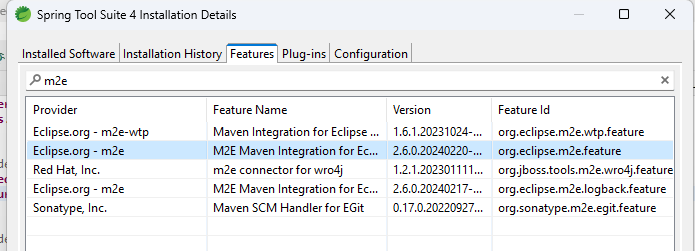
-
Retrieve the source code or fork it if you want to make contribution
-
Import backend plugins from Sirius Web repository in your workspace
-
Update settings.xml file from your .m2 folder to give access to other repositories during the build In order to see dependence with access to add in settings.xml, have a look on backend\application\sirius-web-application\pom.xml You need to create access tokens on Github to complete settings.xml.
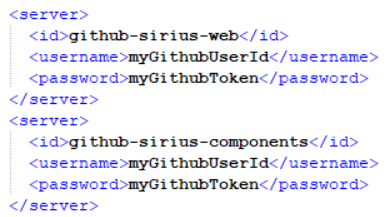
-
Right click on sirius-web-services_ module and then Properties>JavaBuildPath>Source Add main/generated folder and remove excluded content and former antlr/grammar You should retrieve the following Java build path
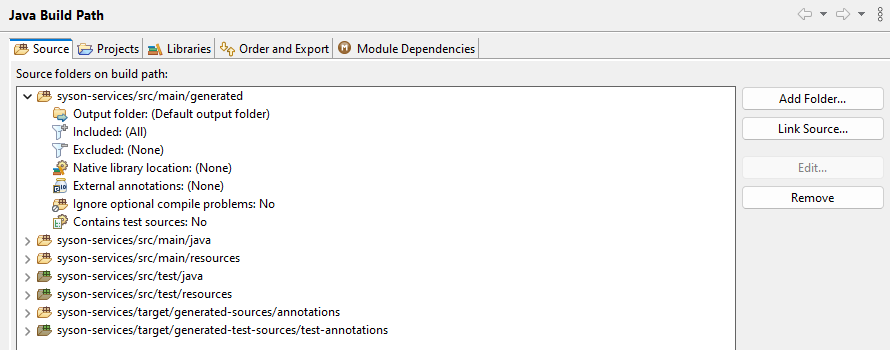
-
Update Maven project by launching "ALT+F5" shortcut on all modules of your workspace
Staying current with Sirius Web ensures access to the latest features, fixes, and security updates. This guide summarizes the upgrade process used by Sirius Web-based applications and draws from the advanced training material.
3. Generate a new OpenAPI documentation of REST API
-
Build and run the {}} server locally (using docker compose as example) on
http://localhost:8080. -
Download the documentation at the url:
http://localhost:8080/v3/api-docs/rest-apis. -
The swagger-ui user interface is
http://localhost:8080/swagger-ui/index.html.
4. Release cadence
-
Calendar versioning (CalVer): releases follow the
YEAR.MONTH.PATCHpattern (for example2024.11.0). -
Stable releases: versions ending with
.0are the general availability (GA) builds recommended for production. -
Intermediate releases: follow-up versions such as
2024.11.1provide early access to fixes. Use them for evaluation; breaking changes may still occur. -
8-week development cycle:
-
Development (4 weeks): new features and enhancements land.
-
Stabilization and feature freeze (2 weeks): focus on testing and bug fixing.
-
Cool down and planning (2 weeks): dependency refresh, documentation updates, and planning of the next cycle.
-
Refer to the published changelog for the detailed scope of each release.
5. Upgrade checklist
-
Review the changelog: list breaking changes for both backend and frontend modules.
-
Update backend dependencies:
-
Bump Sirius Web artifacts in your build files (for example, Maven
pom.xml). -
Rebuild and resolve any compilation errors introduced by API changes.
-
-
Update frontend dependencies:
-
Update npm packages referencing Sirius Web libraries.
-
Run
npm installandnpm run build(or the equivalent) to detect build-time regressions.
-
-
Run automated tests:
-
Backend: unit and integration tests.
-
Frontend: Node.js tests and end-to-end scenarios (Cypress or Playwright, depending on the suite).
-
-
Perform manual validation using your acceptance checklist to confirm the studio still behaves as expected.
-
Package and deploy once the upgraded build passes the quality gates.
| Automate the checklist whenever possible. Continuous integration pipelines help flag regressions early. |
6. Model and schema migrations
Sirius Web migrates representation and view models automatically when resources are loaded. Database schema updates are also applied on startup if needed, so most upgrades are seamless for end users.
When your studio introduces structural changes that require custom migration steps, implement an IMigrationParticipant:
-
Provide a unique participant version (
ITERATION-YYYYMMDDHHMM). -
Inspect and update the model elements that need to change.
-
Register the participant so it runs after the built-in migrations.
@Service
public class NameFeatureChangeMigrationParticipant implements IMigrationParticipant {
  private static final String PARTICIPANT_VERSION = "202405011030";

  @Override
  public String getVersion() {
    return PARTICIPANT_VERSION;
  }

  @Override
  public EStructuralFeature getStructuralFeature(EClass eClass, String featureName) {
    if (DomainPackage.eINSTANCE.getDomain().equals(eClass)
        && "name2".equals(featureName)) {
      return DomainPackage.eINSTANCE.getNamedElement_Name();
    }
    return null;
  }
}
Only participants with a version newer than the one stored in a model run during upgrade, preventing redundant work.
7. Communicating upgrades
-
Announce the target version and planned downtime (if any) to stakeholders.
-
Highlight user-visible changes and new capabilities.
-
Encourage teams to test their projects on a staging environment built from the new release before you promote it to production.