Custom form widgets
Need to render or edit data in a way the standard form widgets don’t provide? You can contribute your own widget type to the form representation by combining backend components (description, GraphQL, mutations, event handler) and frontend pieces (React component, GraphQL document transform, extension points).
1. Backend building blocks
-
Description class: create a subclass of
AbstractWidgetDescription(and the associatedAbstractWidget) that stores the configuration of your widget (for example min/max/current values for a slider). -
Component: implement a Spring bean that extends
IComponent<GQLWidget, IProps>so the generic form rendering pipeline can instantiate your widget from the description and the currentVariableManager. -
Widget descriptor: contribute an
IWidgetDescriptorbean that wires your description, component, and GraphQL type together. Mark it with@Componentso the registry discovers it. -
Mutations (optional): if the widget edits data, add a GraphQL mutation (
*.graphqlsfile declaringtype MyWidgetand aneditMyWidgetmutation), the correspondingIFormInput/IPayloadtypes, and anIFormEventHandler(Spring@Service) that actually applies the change. Each mutation also needs a dedicated data fetcher implementingIDataFetcherWithFieldCoordinatesand annotated with@MutationDataFetcher. -
Schema: place the
.graphqlsfile underresources/schema/so the GraphQL runtime loads it (make sure the GraphQLtypename matches your Java widget class name).
2. Frontend building blocks
-
GraphQL type: declare the TypeScript interface for your widget, extending
GQLWidgetwith the extra fields you exposed in the schema. -
React component: implement a component that matches
PropertySectionComponentProps<GQLYourWidget>and renders the widget (for Details or custom forms). -
Document transform: extend the GraphQL documents to request the extra fields. Use an
ApolloDocumentTransformto append an inline fragment for your widget type. -
Extension points: register the widget in the global
ExtensionRegistry:-
widgetContributionExtensionPoint: provides the icon, preview, and React component to use when aGQLWidgetof your type is encountered. This also enables the widget in the Form Description Editor preview. -
apolloClientOptionsConfigurersExtensionPoint: adds your document transform so the frontend fetches the widget-specific fields.
-
3. View DSL integration
Once the backend/frontend plumbing is in place, expose the new widget to studio makers:
-
Extend the View DSL metamodel (or contribute a custom DSL extension) with the new widget description element.
-
Register the widget in the authoring tooling so it appears in the Form Description Editor/context menus.
-
Provide documentation for the widget-specific attributes/operations so form authors know how to configure it.
4. Slider widget example
The slider widget demonstrates how every building block fits together. It exposes and edits a numeric value within a range.
4.1. Backend implementation
-
Create a concrete subclass of
AbstractWidget(Slider.java) that stores the widget state (min, max, current value) and exposes the functions used for mutations. -
Create the
SliderDescriptionsubclass ofAbstractWidgetDescriptionso form authors can configure the widget. -
Implement
SliderComponent(plus its props) that renders aSliderDescriptioninto aSliderinstance based on the currentVariableManager. -
Register everything in a Spring
@ComponentimplementingIWidgetDescriptor.
If the widget supports mutations:
-
Add the GraphQL schema under
resources/schema/:type Slider implements Widget { id: ID! diagnostics: [Diagnostic!]! label: String! iconURL: String minValue: Int! maxValue: Int! currentValue: Int! } extend type Mutation { editSlider(input: EditSliderInput!): EditSliderPayload! } input EditSliderInput { id: ID! editingContextId: ID! representationId: ID! sliderId: ID! newValue: Int! } union EditSliderPayload = SuccessPayload | ErrorPayload -
Provide the DTOs (
EditSliderInput, payloads, etc.) and anIFormEventHandler(EditSliderValueEventHandler) that applies the mutation. -
Add the mutation data fetcher (
MutationEditSliderDataFetcher) implementingIDataFetcherWithFieldCoordinatesand annotated with@MutationDataFetcher.
|
Ensure the GraphQL type name ( |
4.2. Frontend implementation
-
Declare the widget interface:
import { GQLWidget } from '@eclipse-sirius/sirius-components-forms'; export interface GQLSlider extends GQLWidget { label: string; minValue: number; maxValue: number; currentValue: number; } -
Implement the React component that matches
PropertySectionComponentProps<GQLSlider>(e.g.,SliderPropertySection). -
Extend the GraphQL documents with the extra fields through a
DocumentTransform:export const sliderWidgetDocumentTransform = new DocumentTransform((document) => { if (shouldTransform(document)) { return visit(document, { FragmentDefinition(node) { if (!isWidgetFragmentDefinition(node)) { return undefined; } const sliderWidgetInlineFragment: InlineFragmentNode = { kind: Kind.INLINE_FRAGMENT, selectionSet: { kind: Kind.SELECTION_SET, selections: [labelField, iconURLField, minValueField, maxValueField, currentValueField], }, typeCondition: { kind: Kind.NAMED_TYPE, name: { kind: Kind.NAME, value: 'SliderWidget' }, }, }; return { ...node, selectionSet: { ...node.selectionSet, selections: [...node.selectionSet.selections, sliderWidgetInlineFragment], }, }; }, }); } return document; }); -
Register the widget through the
ExtensionRegistry:const isSliderWidget = (widget: GQLWidget): widget is GQLSlider => widget.__typename === 'SliderWidget'; defaultExtensionRegistry.putData(widgetContributionExtensionPoint, { identifier: `siriusWeb_${widgetContributionExtensionPoint.identifier}_sliderWidget`, data: [ { name: 'SliderWidget', icon: <SliderIcon />, previewComponent: SliderPreview, component: (widget: GQLWidget): PropertySectionComponent<GQLWidget> | null => { let propertySectionComponent: PropertySectionComponent<GQLWidget> | null = null; if (isSliderWidget(widget)) { propertySectionComponent = SliderPropertySection; } return propertySectionComponent; }, }, ], }); const widgetsApolloClientOptionsConfigurer: ApolloClientOptionsConfigurer = (currentOptions) => { const { documentTransform } = currentOptions; const newDocumentTransform = documentTransform ? documentTransform.concat(sliderWidgetDocumentTransform) : sliderWidgetDocumentTransform; return { ...currentOptions, documentTransform: newDocumentTransform }; }; defaultExtensionRegistry.putData(apolloClientOptionsConfigurersExtensionPoint, { identifier: `siriusWeb_${apolloClientOptionsConfigurersExtensionPoint.identifier}`, data: [widgetsApolloClientOptionsConfigurer], });
4.3. View DSL integration
Expose the widget to studio makers by extending the View DSL metamodel with a WidgetDescription subtype (for example SliderDescription):
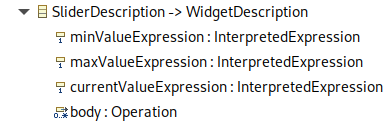
Enable the Child Creation Extenders flag in the GenModel so the View tooling can instantiate your new description.
Then register the metamodel’s EPackage, AdapterFactory, and ChildExtenderProvider, for example with Spring beans:
@Bean
public EPackage sliderWidgetEPackage() {
    return SliderWidgetPackage.eINSTANCE;
}

@Bean
public AdapterFactory sliderWidgetAdapterFactory() {
    return new SliderWidgetItemProviderAdapterFactory();
}

@Bean
public ChildExtenderProvider sliderWidgetChildExtenderProvider() {
    return new ChildExtenderProvider(ViewPackage.eNS_URI, SliderWidgetItemProviderAdapterFactory.ViewChildCreationExtender::new);
}
Finally, provide an IWidgetConverterProvider that maps the modeled description to the runtime AbstractWidgetDescription:
@Service
public class SliderDescriptionConverterProvider implements IWidgetConverterProvider {
    @Override
    public Switch<AbstractWidgetDescription> getWidgetConverter(
            AQLInterpreter interpreter,
            IEditService editService,
            IObjectService objectService) {
        return new SliderDescriptionConverterSwitch(interpreter, editService);
    }
}