Deck Description
🔥 This feature is currently considered experimental. Try it out and give feedback by reporting bugs and suggesting new features. It’s not recommended for production use.
🛠️ This feature is available to studio makers.
This page explains the deck description defined in Sirius Web. It allows you to create Kanban-style boards. It enables you to visualize and organize semantic elements as cards within lanes. You can configure it inside a Studio project by using both the Explorer View and the Details View
1. Introduction
The DeckDescription extends the shared RepresentationDescription, so it follows the same naming, icon, and domain-type conventions used by diagrams, forms, tables, and trees.
Deck descriptions describe how semantic elements become lanes and cards, which tools users can trigger from various actions and how styling is applied to the board.
2. Configuring deck descriptions
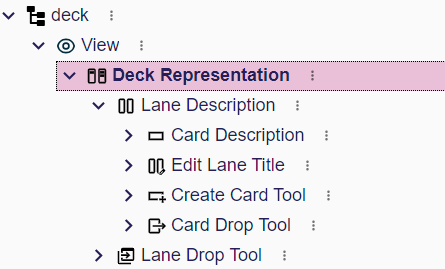
When authoring a deck description you typically follow this workflow:
-
Create a
DeckDescriptionwith a name, the type of the semantic element on which the deck can be created (domainType), and optional style. -
Add one or more
LaneDescriptionentries to map semantic elements to lanes. -
Under each lane, add
CardDescriptionentries for the cards you want to display. -
Configure drag-and-drop and edit tools so the board reacts when users move lanes or cards.
3. Deck Description
3.1. Creation
3.2. Core Properties
Every representation description provides the following fundamentals:
-
name: StringA unique identifier of the description. If the name is changed, existing representations created from this description will stop working. -
domainType: DomainType Fully qualified type of the semantic element on which the representation can be created. For example
flow::Systemorecore::EClass. -
preconditionExpression: InterpretedExpression Expression evaluated on the semantic element on which the representation may be created; the representation is available only when it returns
true. If the expression is not set, the representation is always available. Here are the variables available for this expression:-
self: ObjectThe semantic element on which the representation may be created
-
-
titleExpression: InterpretedExpression Use to compute the default representation label visible when the new representation creation dialog is opened. The end user can choose not to use it and provide instead their own label. This Here are the variables available for this expression:
-
self: ObjectThe semantic element on which the representation may be created
-
-
iconExpression: InterpretedExpression Used to compute the icon associated with the representation. This expression should return an icon path, for example the path of an image file in the application like
aql:'/folder/icon.svg'for an icon available in a specific folder of a maven module.-
self: ObjectThe semantic element on which the representation is being created
-
-
description: StringSome documentation to let the studio makers understand the purpose of the representation. -
endUserDocumentation: StringSome documentation to let the end users understand the purpose of the representation.
3.3. Rendering
All the expressions evaluated during the rendering of the Deck representation can have access to the following variables:
-
self: The semantic element used as a target for the concept being rendered -
editingContext: The editing context which can be used to access additional data (find other semantic elements, find representation descriptions, etc).
3.3.1. Deck Description
Under a DeckDescription, you can use the following concepts to render the deck:
-
laneDescriptions: Ordered collection ofLaneDescriptionentries. -
style: An instance ofDeckDescriptionStylethat controls board-level styling. -
conditionalStyles: A list ofConditionalDeckDescriptionStyleentries that override the base style when their condition evaluates totrue.
Under the DeckDescriptionStyle, you can configure the following attributes to change the style of the board:
-
backgroundColor: Reference of a color used as the background of the board
The same properties are available on ConditionalDeckElementDescriptionStyle along with a preconditionExpression used to detect if the conditional style should override the default style.
3.3.2. Lane Description
The LaneDescription includes the following attributes to configure the rendering:
-
name: The unique identifier of the lane -
semanticCandidatesExpression: The expression that returns the collection of semantic elements handled by the lane (defaults toaql:self). One can return a list of semantic element to create a lane for each element using one lane description. -
titleExpression: The expression used for the title visible on the top left of the lane. -
labelExpression: The expression used for the secondary text shown in the top right of the lane. -
domainType: The qualified name of an entity used to filter the results of thesemanticCandidatesExpression. -
isCollapsibleExpression: The expression used to indicate if a lane can be collapsed (defaults toaql:true).
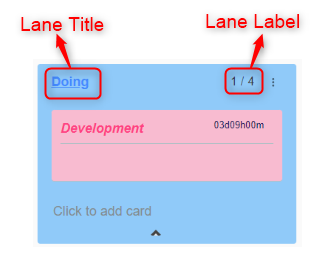
It also contains the following objects
-
style:DeckElementDescriptionStyleused to configure the style of the lane -
conditionalStyles: list ofConditionalDeckElementDescriptionStyleentries evaluated in order, each inheriting condition logic from the sharedConditionalclass. -
ownedCardDescriptions: containment reference that stores allCardDescriptionsshown in the lane.
By combining these attributes you can control which semantic objects produce lanes, what happens when new cards appear, and whether individual lanes can be hidden on demand.
3.3.3. Card Description
The CardDescription includes the following attributes to configure the rendering:
-
name: The unique identifier of the lane -
semanticCandidatesExpression: The expression that returns the collection of semantic elements handled by the lane (defaults toaql:self). One can return a list of semantic element to create a lane for each element using one lane description. -
titleExpression: The expression used for the title visible on the top left of the lane. -
labelExpression: The expression used for the secondary text shown in the top right of the lane. -
domainType: The qualified name of an entity used to filter the results of thesemanticCandidatesExpression. -
descriptionExpression: expression used to render the body of the card (defaults toaql:self).
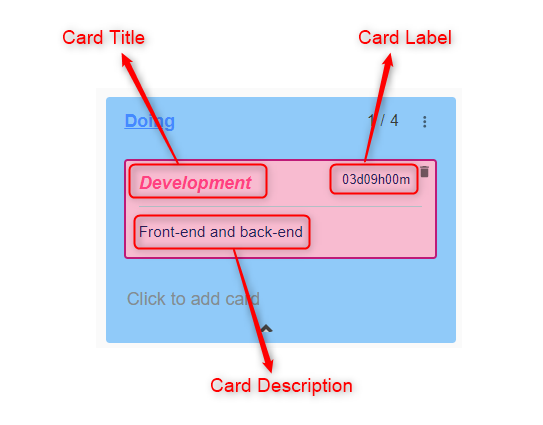
It also contains the following objects
-
style:DeckElementDescriptionStyleused to configure the style of the card -
conditionalStyles: list ofConditionalDeckElementDescriptionStyleentries evaluated in order, each inheriting condition logic from the sharedConditionalclass.
3.3.4. Styles
-
DeckDescriptionStyleexposes abackgroundColorreference so you can align the board with your branding. -
ConditionalDeckDescriptionStyleinherits fromConditionaland lets you override the board style using expressions (for example, based on workspace or project type).
3.4. Tools
Under DeckDescription:
* laneDropTool: The tool executed when users reorder lanes.
Under LaneDescription:
* editTool: EditLaneTool used when a user renames or edits lane properties.
* createTool: CreateCardTool that creates a new card inside the lane.
* cardDropTool: executed when a card is dropped into the lane to move or clone semantic elements.
Under CardDescription:
* editTool: EditCardTool that runs when inline edits or dialogs submit new values.
* deleteTool: DeleteCardTool responsible for removing the card and its semantic element.
Every deck tool inherits from DeckTool, which defines the name of the tool and a body made of operations executed when the tool runs.
The representation description provides the following concrete tools:
-
CreateCardTool: creates a semantic element and its card inside a lane. -
EditCardTool: updates semantic data or view attributes after inline edits. -
DeleteCardTool: removes a card and runs cleanup logic. -
EditLaneTool: lets users rename, recolor, or otherwise edit lane-level metadata. -
CardDropTool: handles drag-and-drop of cards between lanes, typically updating attributes such as status or owner. -
LaneDropTool: manages lane reordering or drops that target the board background.
Tool bodies use the shared operation language (ChangeContext, CreateInstance, SetValue, UnsetValue, DeleteElement, Let, If, For), so you can orchestrate domain-specific workflows whenever users interact with the deck.